

What Airtable Actually Is
Airtable looks like a spreadsheet but works like a database. That might sound technical, but here’s what it means in practice:
Spreadsheet (Google Sheets): Flat data. Everything in rows and columns. No relationships between information. Limited views. Breaks when multiple people work in it.
Airtable: Relational database. Information connects to other information. Multiple views of the same data. Different people can work simultaneously. Automations built in.
It’s the power of a proper CRM without the complexity or cost.
Why Airtable Works Brilliantly as a CRM
1. It’s Actually Free for Small Businesses
Airtable’s free plan gives you:
- Unlimited bases (databases)
- 1,200 records per base
- 2GB of attachments
- Basic automations
- Multiple views (grid, calendar, kanban, gallery)
For most Irish small businesses with under 1,000 customers, this is plenty. You’re not hitting limits. You’re not paying monthly fees.
2. You Can Mould It to YOUR Business
Unlike rigid CRM platforms that force you into their workflow, Airtable adapts to how YOU work.
Service business? Build a base with clients, projects, invoices, and tasks – all linked together.
Coaching business? Track students, courses, progress, payments, and communication history.
E-commerce? Manage orders, customers, inventory, and fulfillment in one place.
You’re not adapting your business to the software. The software adapts to your business.
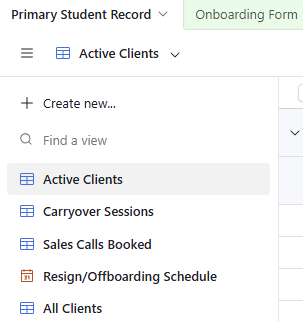
3. Multiple Views of the Same Information
Your data doesn’t live in one rigid spreadsheet. You can view it multiple ways:
Grid view: Traditional spreadsheet layout Calendar view: See deadlines and schedules Kanban view: Track progress through stages Gallery view: Visual cards for each record Form view: Collect information from clients or team
Same data, different views depending on what you need to see.
4. Relationships Between Information
This is where Airtable becomes powerful.
In a spreadsheet, if you want to see all projects for a specific client, you’re scrolling and searching.
In Airtable, you link the client record to their project records. Click the client, instantly see all their projects. Click a project, instantly see the client details.
Information connects. You’re not copying and pasting. You’re not maintaining the same data in multiple places.
5. Built-in Automations
Airtable includes basic automations even on the free plan:
- When a new record is created → send email notification
- When a field changes → update related records
- When a date arrives → create reminder task
- When status changes → notify team member
Simple but powerful for keeping things moving without manual work.
Pair Airtable with Zapier: Mega System
Here’s where it gets really good.
Airtable alone is useful. Airtable connected to your other business tools via Zapier becomes a complete business system.
Example workflows:
Website inquiry → Airtable → Email sequence
- Someone fills form on your website
- Zapier creates new record in Airtable
- Airtable automation sends welcome email
- Task created for follow-up in 3 days
Payment received → Update Airtable → Send onboarding
- Client pays via Stripe
- Zapier updates client record in Airtable (status: paid)
- Airtable automation triggers onboarding email
- Calendar invite sent automatically
New project → Create tasks → Notify team
- Project added to Airtable
- Zapier creates tasks in ClickUp or Asana
- Airtable notifies assigned team members
- Calendar blocking happens automatically
According to Zapier’s research, businesses using automation tools like this save an average of 16 hours weekly on manual data entry and task management.
Zapier’s free plan includes 100 tasks monthly – plenty for smaller businesses getting started.
Real Example: Service Business Setup
Let me show you what this looks like in practice.
The Problem: Cork-based service business with 6 employees. Running on Google Sheets and WhatsApp. Client information scattered. Project status unclear. Team constantly asking “where’s this client’s information?”
The Airtable Solution:
Base Structure:
- Clients table: Contact info, company details, relationship history
- Projects table: Linked to clients, status tracking, deadlines, deliverables
- Tasks table: Linked to projects, assigned to team members
- Invoices table: Linked to clients and projects, payment tracking
Views Created:
- Client overview (grid showing all clients)
- Active projects (kanban board by status)
- This week’s tasks (calendar view)
- Unpaid invoices (filtered grid)
- Team workload (grouped by assigned person)
Automations Set Up:
- New client added → Welcome email sent, onboarding tasks created
- Project status changes to “complete” → Invoice generated, client notified
- Invoice 7 days overdue → Reminder sent, task created for follow-up
- Task assigned → Team member notified via Slack
Zapier Connections:
- Website contact form → Creates Airtable client record
- Stripe payment received → Updates invoice status in Airtable
- Airtable task created → Adds to team member’s ClickUp
- Project completed → Generates review request via email
Results:
- Zero time wasted searching for client information
- Team knows exactly what needs doing and when
- Clients get consistent, timely communication
- Projects move through stages without manual tracking
- Owner can see business health at a glance
Cost: Free (Airtable free plan + Zapier free plan) Setup time: 2 days to build, 1 day to train team
When Airtable Works (And When It Doesn’t)
Airtable is perfect if:
✅ You have under 1,000-1,500 customers
✅ You need flexibility to build exactly what you want
✅ You’re currently on spreadsheets and need to upgrade
✅ You want free or low-cost solution
✅ You have someone technical enough to set it up (or hire someone to build it)
✅ Your business has unique workflows that standard CRMs don’t handle
Airtable might not fit if:
❌ You need 10,000+ customer records (upgrade to paid or use different platform)
❌ You want something pre-built with zero setup (use standard CRM instead)
❌ You need advanced marketing automation (use GoHighLevel or HubSpot)
❌ You require complex reporting and analytics (use proper BI tool)
❌ You have zero technical comfort and won’t hire someone to set it up
For most Irish small businesses with 1-10 employees? Airtable is brilliant.
How to Actually Build Your Airtable CRM
Step 1: Plan Your Structure
Before opening Airtable, map out what you need to track:
Core tables most businesses need:
- Contacts/Clients
- Projects or Services
- Tasks or To-Dos
- Communications/Notes
Optional tables:
- Invoices
- Products/Services offered
- Team members
- Documents
Think about relationships: Which tables link to which? A project links to a client. Tasks link to projects. Invoices link to clients and projects.
Step 2: Start Simple
Don’t build everything at once. Start with your most critical need.
If you’re losing track of clients – build the Clients table first. Get that working. Add other tables later.
If project management is the issue – start with Projects table. Expand from there.
Step 3: Create Your Tables
Sign up for Airtable free and create your first base.
For a Clients table, include:
- Client name
- Contact information (email, phone)
- Company details
- Status (lead, active, past)
- Linked projects
- Notes/communication history
- Important dates
Add fields as you need them. Don’t overthink it.
Step 4: Add Views
Create different views of your data:
- All clients (grid view)
- Active clients only (filtered grid)
- Clients by status (grouped grid)
- Follow-up calendar (calendar view showing next contact dates)
Different team members might need different views.
Step 5: Set Up Basic Automations
Start with simple automations:
- New client added → Send welcome email
- Status changes → Notify team member
- Date arrives → Create reminder task
Airtable’s automation builder is visual and relatively simple. You don’t need to code.
Step 6: Connect Other Tools via Zapier
Once your Airtable structure works, connect it to your other business tools:
Common Zapier connections:
- Website forms → Airtable (new lead capture)
- Airtable → Gmail (automated emails)
- Airtable → Slack (team notifications)
- Stripe → Airtable (payment updates)
- Airtable → Google Calendar (appointment sync)
Zapier’s free plan gives you 100 tasks monthly – enough to get started.
Common Airtable CRM Setups
Service Business CRM
Tables:
- Clients
- Projects
- Tasks
- Invoices
Key features:
- Track project stages (kanban view)
- Assign tasks to team members
- Link invoices to projects
- Communication history with clients
Automations:
- Project completed → Invoice generated
- Payment received → Thank you email
- Task overdue → Reminder sent
Coaching/Course Business CRM
Tables:
- Students
- Courses/Programs
- Sessions/Lessons
- Payments
Key features:
- Track student progress
- Schedule sessions (calendar view)
- Monitor completion rates
- Payment status tracking
Automations:
- New enrollment → Welcome sequence
- Session reminder 24 hours before
- Course completed → Request testimonial
E-commerce Operations
Tables:
- Customers
- Orders
- Products
- Inventory
Key features:
- Order fulfillment tracking
- Inventory management
- Customer purchase history
- Shipping status
Automations:
- Order placed → Create fulfillment task
- Inventory low → Reorder notification
- Order shipped → Customer notification
What About GDPR?
Critical question for Irish businesses.
Airtable is GDPR compliant and allows you to manage customer data properly according to Data Protection Commission guidelines.
Key GDPR features in Airtable:
- Control who can access what data
- Delete customer records completely when requested
- Export customer data if they request it
- Track who viewed or edited records
- Set data retention policies
You’re responsible for HOW you use it, but the platform itself supports GDPR compliance.
Getting Help Building Your Airtable CRM
You can build an Airtable CRM yourself if you’re comfortable with technology. Airtable has excellent documentation and video tutorials.
But most business owners don’t have 20-40 hours to figure it out properly.
Professional Airtable build:
- 1-2 weeks setup time
- Custom structure for your business
- Automations configured
- Zapier connections set up
- Team training included
- Documentation provided
Typical cost: €1,497-€1,997 depending on complexity
DIY time investment: 30-50 hours figuring it out yourself
Most business owners would rather pay for proper setup and get back to running their business.
If you want to explore what an Airtable setup would look like for your business, book an Operations Review (€347) and we’ll map out exactly what you need.
Or contact me about a custom Airtable build if you’re ready to get off spreadsheets.
The Bottom Line on Airtable as a CRM
If you’re an Irish small business running on Google Sheets and WhatsApp, you need a proper system.
But you probably don’t need a €200/month enterprise CRM with features you’ll never use.
Airtable is free. It’s flexible. It works brilliantly as a CRM when set up properly. And paired with Zapier, it becomes a complete business system.
You can build it yourself if you’re technical. Or get it built professionally and have it working in 1-2 weeks.
Either way, you stop losing leads, wasting time searching for information, and running your business on memory and hope.
Ready to see what Airtable could do for your business?
Join Airtable free and start building.
Or book an Operations Review if you want help figuring out exactly what your business needs.

